When I started my new game project, I wanted to build it differently than my previous games. I knew I wanted to make a card game, but I didn’t want to follow the trend of roguelike deckbuilders. Instead, I wanted to build a more tactical, strategy-focused card game.
Normally, I would jump straight into Unreal Engine and start coding. I’ve been writing code for a long time, so that’s how I naturally think through problems. In the past this has led to a lot of refactoring.
This time, I started on paper instead.
Construction Paper
Since I was using the same fantasy world I built for A Witch’s Path, it was easy to transition that setting into a card game. With the existing lore, I created three Heroes: Smasher, Guardian, and Artisan, along with their card decks.
Here’s what the first paper decks looked like:
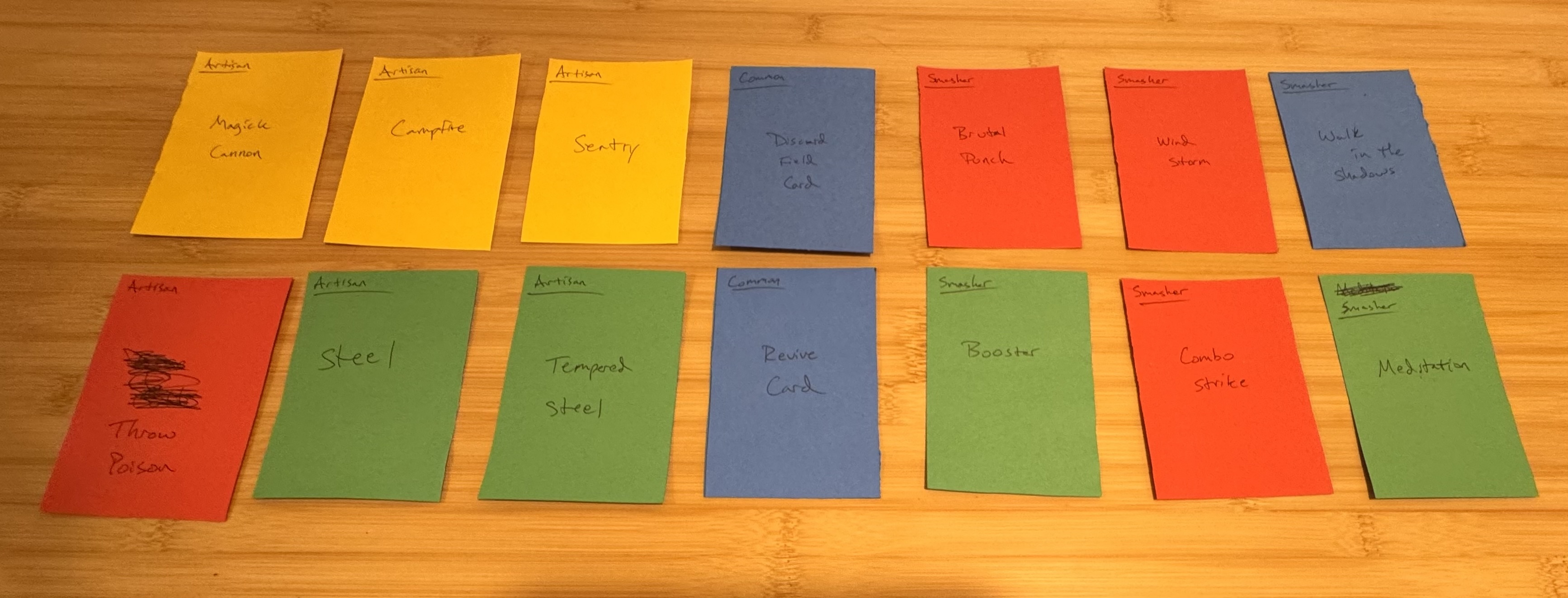
I drew the battlefield layout on a whiteboard and sat down to play a match. I pitted the Smasher against the Artisan. The first match dragged on for about 30 minutes before I gave up. Each Hero had 100 HP, and most cards dealt between 5 and 15 damage per hit. Between healing cards and stun effects, the match took way too long.
The Takeaway
The match dragged because there were too many dead turns where no actions were available.
What Does This Mean?
The game needed a consistent action that could be used every turn to keep the match moving forward.
The Result
For the second match, I added a Hero Skill that is always available. This time, I was able to finish the match in about 15-20 minutes.
This was the moment the game started to click. I finally had a card game that could be played and completed in a reasonable amount of time.
However, that was only the first insight I gained from the paper prototype phase. I kept playing more matches and discovered several mechanics that needed to be cut.
Cut Mechanics
- Cards can be buffed
- AP can be manipulated
- Cooldowns can be manipulated
Let’s go through each of these and why I decided to remove them.
Cards Can Be Buffed
In the original design, Skill cards were nearly as complex as the Heroes themselves. Each card could be separately affected by Poison, Bleed, Shield, and Stun. Managing all of this on paper quickly became a nightmare. I had to track buffs, cooldowns, and construction manually.
Even when I finished a match, it was hard to tell whether I had miscalculated something. That made it difficult to understand who won and why.
Once I removed card buffs, matches became easier to play and understand.
AP Can Be Manipulated
Each turn, the player has 4 Action Points (AP). Drawing cards costs AP, each card has its own AP cost, and the Hero skill also has an AP cost. This is where much of the tactical depth comes from.
In the early designs, some cards could restore AP or reduce the opponent’s AP. At first, I liked this idea because it felt like a clever, meta attack. But while playing matches, it started to feel unfair. Not only could you damage the opponent, but you could also take away their ability to respond.
When used well, these effects made matches very one‑sided.
I didn’t completely remove this idea at first. When I started coding the combat system, I left placeholders for AP manipulation. But as development continued, it never felt necessary to add back in, and I think the game is better because of that.
Cooldowns Can Be Manipulated
This mechanic was closely related to AP manipulation, and I cut it for similar reasons. It created another form of soft lock, where one player could prevent the other from recovering.
That said, I did keep a very narrow version of this idea. Cards themselves cannot be stunned or have their cooldowns manipulated. However, the Hero can be stunned, which pauses the cooldown of their Hero Skill.
So the mechanic still exists, but in a much more limited and controlled form than the original design.
From Paper to Unreal
After working with the paper prototype until the game felt solid, I jumped into Unreal Engine to build the combat system. For the first time, I started a project with a design that already felt stable.
I already knew which mechanics worked and which ones didn’t. That made implementing the combat system faster and easier, saving me months of refactoring.
Combat Prototype: https://mini-game-dev.itch.io/project-arden-card
Up Next: Building & Balancing the Card Decks