

Introduction
Hey everyone! One of the first problems I tackled on my game was building the inventory system. This article is going to run through the process for creating a simple stackable inventory system in C++ for Unreal Engine 5.5. I’m working on an M1 Macbook, so all of my code was written in Xcode. I’ve also put all of the code for the Inventory system on my Github here. This does not include the implementation of any inventory interface. This is just the code for creating and storing items.
C++ Inventory System
Whether you started your project with Blueprints or are starting fresh with C++, all you’ll need to build your inventory system is to create three new files. One file will be your InventoryComponent. This is what will be attached to the player character. The second will be an InventorySlot object. The InventorySlot object is responsible for holding a reference to the item and a count of the current stack. The last item is the InventoryItem struct itself. This struct will hold all the metadata for an item in the game world.
Start by navigating to the Tools menu, then New C++ Class…. You’ll want to create a class derived from ActorComponent and two classes derived from the base Object.
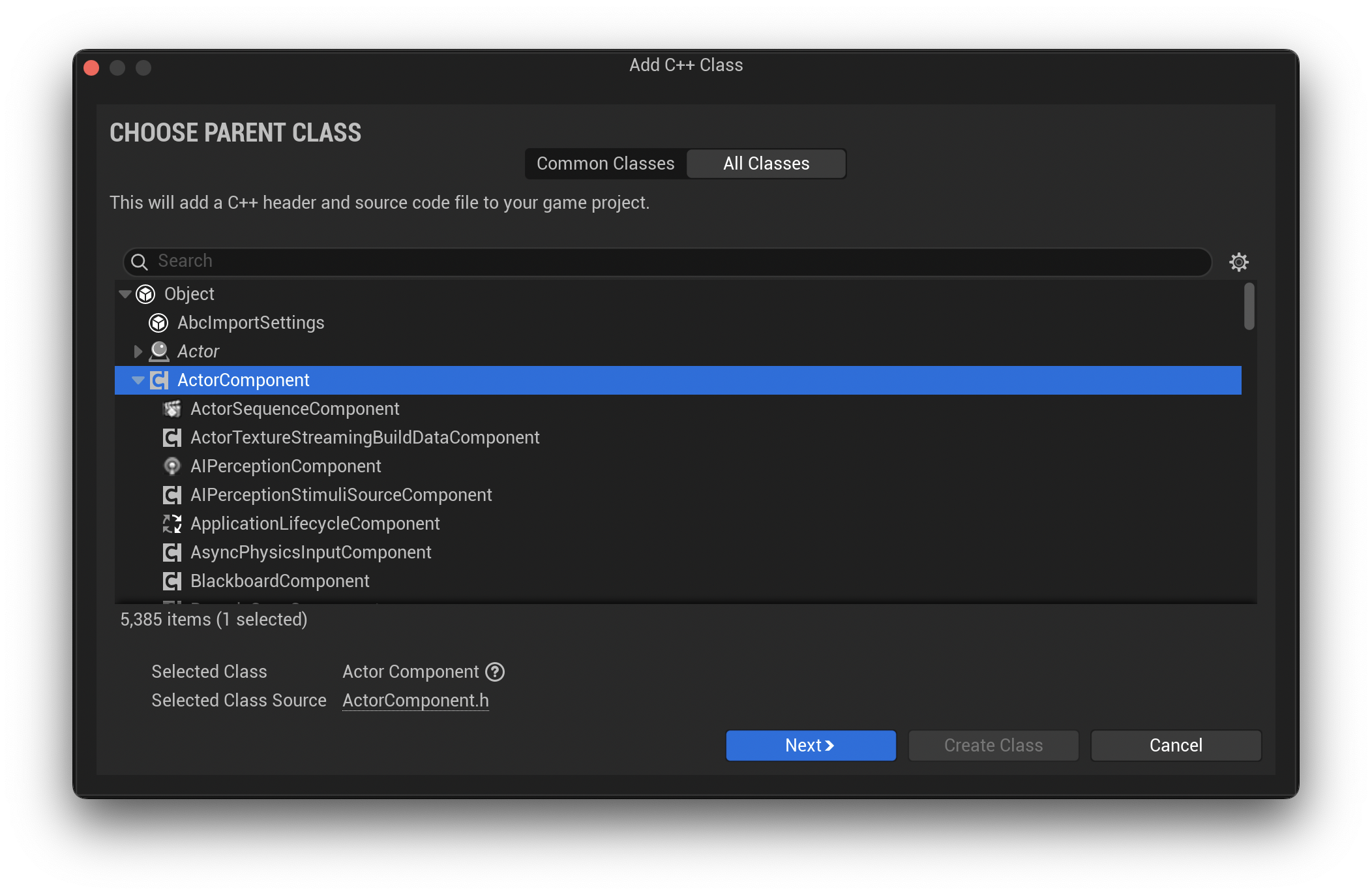
This will create two files for each new object, one .h header file and one .cpp file. If you are unfamiliar with C++, there are a bunch of great tutorials and articles out there. Check them out before continuing.
There are also Unreal Engine specific conventions that need to be followed. When creating a C++ class through the engine, it will automatically prefix your classes with U, so you don’t need to specify this when creating your files. All Unreal Engine classes that inherit UObject will have a prefix of U. Other conventions include prefixing structs with the letter F. The links at the end of this article have Unreal’s documentation on all of their conventions.
Inventory Item
Now, with the files setup, we’ll start with the InventoryItem.h. We created this as a class inheriting from Object, however, we’ll need to change this over to a struct. We can do that by replacing class with struct. The UCLASS declaration will need to be switched over to USTRUCT and the GENERATED_BDOY() needs to be GENERATED_USTRUCT_BODY()
Also, if you want to use Data Tables in Unreal Engine, which I would highly recommend, we’ll need to inherit from the FTableRowBase struct. This will expose it to the engine so it can used with Data Tables.
The new declaration should look as follows:
USTRUCT(BlueprintType)
struct <PROJECT_API> FUInventoryItem : public FTableRowBase
{
    GENERATED_BODY()

public:
    // Public Properties go here...
};
The USTRUCT(BlueprintType) reference will expose this struct to Unreal’s blueprint system. Also, be sure to prefix all your structs with the letter F. This is required by Unreal and your project won’t compile without it.
The rest of the code for the item declares the properties. We’ll want to make sure to declare each property we want to use in the engine with a UPROPERTY declaration. Here’s a base set of properties any inventory item would need:
UPROPERTY(BlueprintReadWrite, EditDefaultsOnly, meta=(DisplayName="ID", MakeStructureDefaultValue="0"))
int32 ID;

UPROPERTY(BlueprintReadWrite, EditDefaultsOnly, SaveGame, meta=(DisplayName="Name"))
FString Name;

UPROPERTY(BlueprintReadWrite, EditDefaultsOnly, SaveGame, meta=(MultiLine="true", DisplayName="Description"))
FString Description;

UPROPERTY(BlueprintReadWrite, EditDefaultsOnly, SaveGame, meta=(DisplayName="IsStackable", MakeStructureDefaultValue="False"))
bool IsStackable;

UPROPERTY(BlueprintReadWrite, EditDefaultsOnly, SaveGame, meta=(DisplayName="StackSize", MakeStructureDefaultValue="0"))
int32 StackSize;
I’m not going to go through the metadata declared in each UPROPERTY. Check out Unreal’s documentation, there’s a lot of options. With the InventoryItem.h declared with its properties, let’s move to the InventorySlot.h.
Inventory Slot
This is an easy one. Here’s the whole declaration with its properties:
UCLASS(BlueprintType)
class <PROJECT_API> UInventorySlot : public UObject
{
	GENERATED_BODY()

public:

    UPROPERTY(BlueprintReadWrite, EditAnywhere, meta=(DisplayName="Item"))
    FUInventoryItem Item;

    UPROPERTY(BlueprintReadWrite, EditAnywhere, meta=(DisplayName="Count"))
    int32 Count;

    UInventorySlot();
};
Similar to the struct, the InventorySlot needs be marked with a UCLASS(BlueprintType) and prefixed with the letter U. The two properties are the Item and the Count. Now let’s talk about the InventoryComponent.h.
Inventory Component
The declaration will look very similar to the other, but in this case, the class will inherit from UActorComponent.
UCLASS(ClassGroup=(Custom), meta=(BlueprintSpawnableComponent))
class <PROJECT_API> UInventoryComponent : public UActorComponent
{
	GENERATED_BODY()

public:
    UInventoryComponent();

protected:
	virtual void BeginPlay() override;
};
If you created your InventoryComponent file using Unreal’s dialog box, it will have a Tick method declared. I removed this as it doesnt’t need access to the tick functionality.
The rest of the header will consist of the properties and methods that are going to be implemented in the .cpp file.
Public:
DECLARE_DYNAMIC_MULTICAST_DELEGATE(FOnInventoryChangeDelegate);

UPROPERTY(BlueprintAssignable, Category="Delegates")
FOnInventoryChangeDelegate OnInventoryChangeEvent;

UPROPERTY(BlueprintReadWrite, EditAnywhere, SaveGame, meta=(DisplayName="MaxSlotSize"))
int32 MaxSlotSize;

UFUNCTION(BlueprintCallable, Category="Inventory")
virtual bool AddItem(FUInventoryItem Item, int32 Count);

UFUNCTION(BlueprintCallable, Category="Inventory")
virtual bool RemoveItemAtIndex(int32 Index, int32 Count);

UFUNCTION(BlueprintCallable, Category="Inventory")
virtual bool RemoveItems(TArray<FUInventoryItem> Items);

UFUNCTION(BlueprintCallable, Category="Inventory")
virtual void Clear();

UFUNCTION(BlueprintCallable, Category="Inventory")
virtual int32 GetLength();

UFUNCTION(BlueprintCallable, Category="Inventory")
virtual int32 GetMaxSize();

UFUNCTION(BlueprintCallable, Category="Inventory")
virtual UInventorySlot* GetSlot(int32 Index);

UFUNCTION(BlueprintCallable, Category="Inventory")
virtual TArray<UInventorySlot*> GetSlots();Protected:
UPROPERTY(BlueprintReadWrite, EditAnywhere, SaveGame, meta=(DisplayName="InventorySlots"))
TArray<UInventorySlot*> InventorySlots;Private:
void AddItemToNewSlot(FUInventoryItem Item, int32 Count);Implementation
(content continues unchanged)
Conclusion
(unchanged)