
So far, I’ve built a card combat system, but that was never meant to be the full game.
From the beginning, I didn’t want to build another roguelike. I wanted something closer to the original Final Fantasy or Pokémon games:
- A structured journey and persistent world
- Enemy Encounters
- Story Gates
- Resource Pressure
That means two things:
- The game needs a deliberate overworld
- The game needs an architecture that can support that overworld without turning into a mess
Let’s break both down.
The Overworld Design
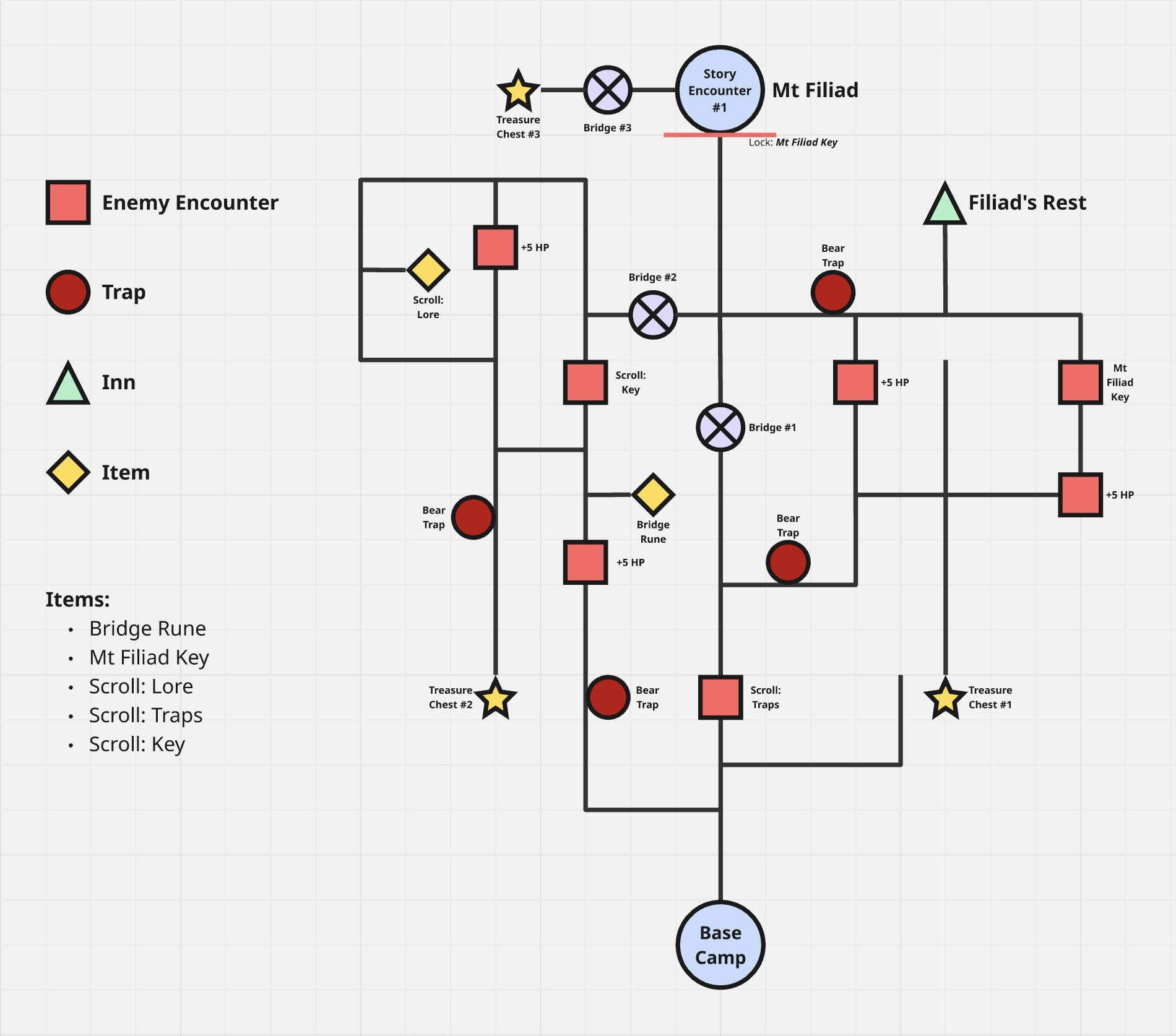
The diagram above shows Area 1.
The player starts at Base Camp. Their objective is to reach Story Encounter #1 (Mt. Filiad) to progress forward. The entire area is structured as a navigation puzzle.
There are optimal and less optimal routes, traps, and optional battles. There are scrolls that reveal information. The player can brute force their way through, but that comes at a cost.
Unlike the games that inspired it, this overworld is not open. There is no backtracking and each area is self-contained. When you complete one, you move forward permanently.
Persistent HP as Pressure
HP persists across the entire area. Damage taken in one encounter affects the next. There is no soft reset between fights.
HP can be restored, but are limited to:
- Inns (full restore)
- Winning battles (+5 HP)
- Environmental Rewards (+10 HP)
So the question for players is: How much can you afford to explore before the Story Encounter?
No XP Grinding
I’ve deliberately removed any XP system. XP introduces balance complexity, attribute inflation, grinding loops, and additional technical tracking. For a small scoped game, that adds a lot of complexity. So, instead of grinding XP, the player grinds information via Scrolls.
Scrolls as Progression
Scrolls replace XP by revealing information to the player such as:
- Which enemy holds a key
- Where traps are located
- Strategic hints for upcoming fights
This creates the following tradeoffs:
- Fully explore the area and gain knowledge, but potentially lose HP.
OR
- Rush the objective with limited information, but arrive healthier.
That tension between information and survival is the core of the whole game.
The Rules Engine
Once the overworld design was clear, the harder question was how do I build this?
In past projects, I embedded gameplay logic directly inside actors. That works at small scale and is the accepted approach for UE5 development practices.
However, when I was building A Witch’s Path, that approach bit me hard. Mid-development refactors became painful. Systems were tightly coupled and changes cascaded through multiple layers. That experience is one of the reasons I spent a large portion of 2025 building my SimpleX plugins.
Arden Card 1 currently uses:
These plugins solve domain problems well, but not gameplay orchestration. For that, I built a new plugin.
RuleForge
RuleForge is a UE5 plugin for defining gameplay logic as data-driven rules.
A Rule consists of:
- A Condition
- A True Effect
- A False Effect
When an Event is published, the corresponding rule executes.
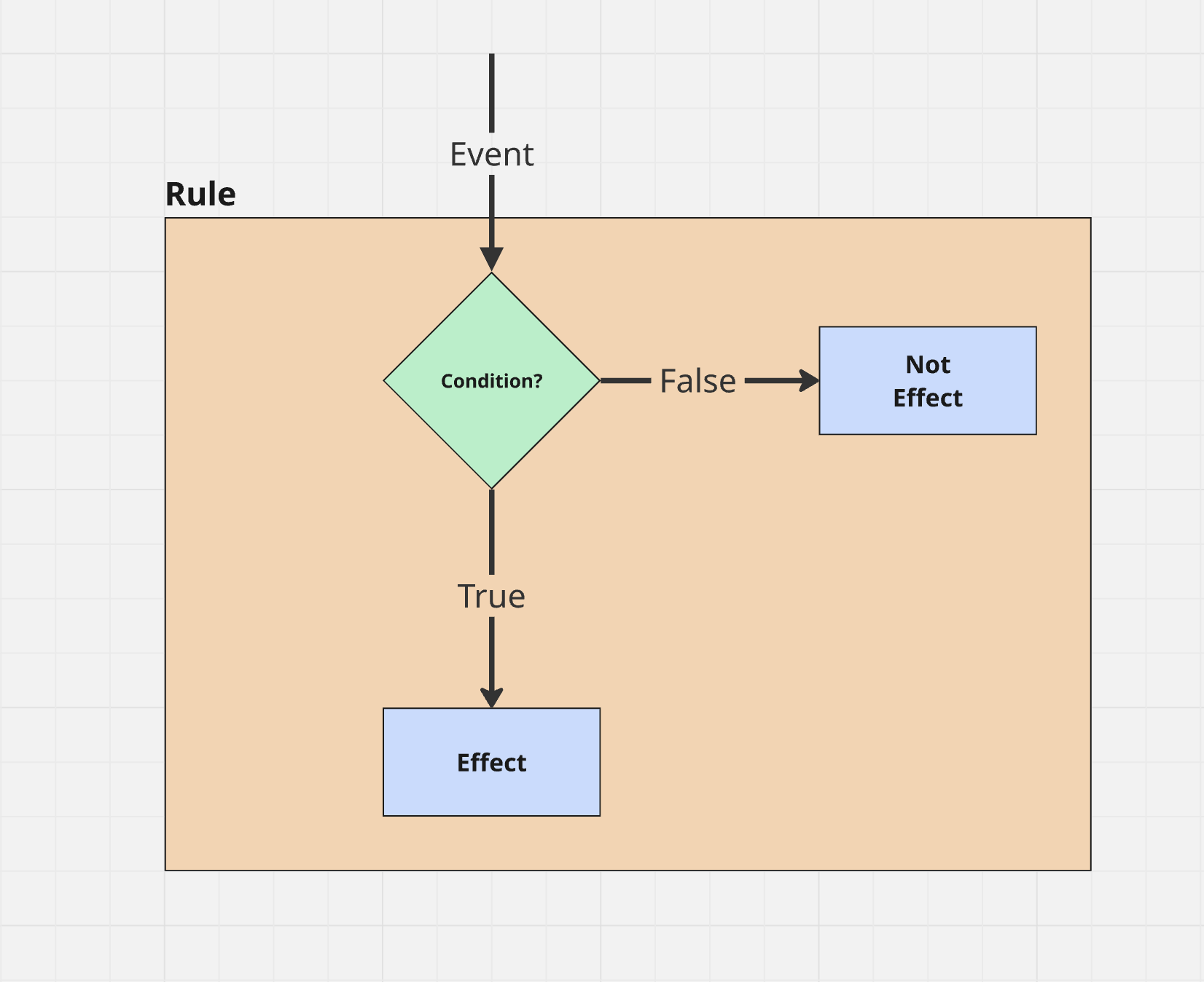
Instead of embedding logic directly in actors, I compose small Condition and Effect classes that evaluate and mutate state.
Rules are defined as data. Areas become rule configurations rather than code embedded into actors or global systems.
Conditions
Here’s the condition used to check if the player has a specific item:
Header:
class ARDENCARD_API UArdenCardHasItemCondition : public URuleForgeCondition
{
    GENERATED_BODY()

public:
    UPROPERTY(BlueprintReadWrite, EditAnywhere)
    FName InventoryID;

    UPROPERTY(BlueprintReadWrite, EditAnywhere)
    FName ItemID;

    UPROPERTY(BlueprintReadWrite, EditAnywhere)
    int32 Quantity = 1;

    virtual bool EvaluateCondition(UObject* WorldContextObject, URuleForgeRuntimeEvent* Event) override;
};
Implementation:
bool UArdenCardHasItemCondition::EvaluateCondition(UObject* WorldContextObject, URuleForgeRuntimeEvent* Event) {
    return UArdenCardGameState::HasInventoryItems(
        WorldContextObject,
        InventoryID,
        ItemID,
        Quantity
    );
}
The condition is small, focused, and parameterized. It delegates to a Blueprint Function Library that wraps the inventory plugin, but it only ever does one thing.
Effects
Here’s the Effect used to activate doors (or anything activatable):
Header:
class ARDENCARD_API UArdenCardActivateEffect : public URuleForgeEffect
{
    GENERATED_BODY()

protected:
    virtual void ExecuteEffect(UObject* WorldContextObject, URuleForgeRuntimeEvent* Event) override;
};
Implementation:
void UArdenCardActivateEffect::ExecuteEffect(UObject* WorldContextObject, URuleForgeRuntimeEvent* Event) {
    for (auto* EventActor : Event->Actors) {
        if (EventActor->GetClass()->ImplementsInterface(UArdenCardActivatable::StaticClass())) {
            IArdenCardActivatable::Execute_Activate(EventActor);
        }
    }

    Complete();
}
This uses an interface (IArdenCardActivatable) so the same Effect can activate doors, bridges, encounters, or anything else that implements it.
Because the logic lives in the rule system, the actors themselves are just event publishers.
A Concrete Example
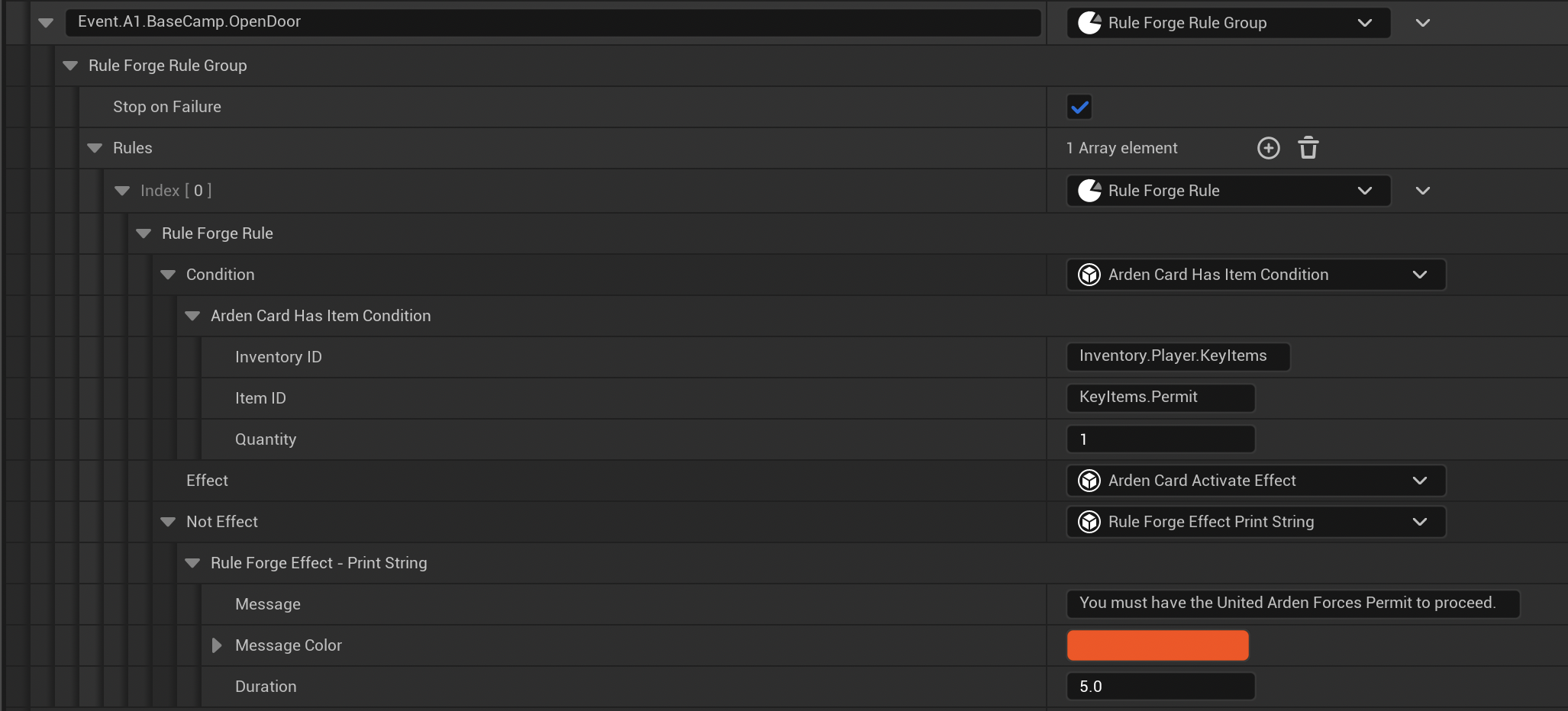
Below is the rule for opening the Base Camp door.
- Condition: Player has
KeyItems.Permit - True Effect: Activate door
- False Effect: Print message (Temporary: This will become a UI prompt)
All RuleForge effects are asynchronous. That means an effect can:
- Transition levels
- Display menus
- Trigger cutscenes
- Chain other effect groups
The plugin also supports EffectGroups, which allow sequencing multiple effects without burying logic in actor blueprints or creating multiple rules for a single action.
Why This Architecture Matters
With RuleForge:
- Areas are rule sets
- Actors are event publishers
- Gameplay flow is data-driven
- Rules can be swapped or modified without rewriting actor logic, at runtime
Where to Next
Right now I’m building Area 1 fully playable in greybox without visuals. I want to test whether the loop between:
- Persistent HP
- Navigation tradeoffs
- Scroll-driven knowledge
- Story encounter pacing
actually feels good to play before I add any visuals.
Combat Prototype: https://mini-game-dev.itch.io/project-arden-card
Up Next: The Prototype - Bringing It All Together